Web Service Security using SOAP Extension
Yesterday I was trying to secure my webserice from unauthorized use.
Although there are many ways to secure webservices. Using WSE, WS-security, SOAP Extension, restricting through IP access, implementing certificates etc etc etc.
WSE would be the comfortable way but in my case it was time consuming to implement at both server and client end as there were hundreds of services. Restricting IP throu IIS or http handler / modules would be a good choice. I tried to do it with SOAP Extension that could be plug and play with a single entry in web.config. It works like httpmodule that reside in pipeline of communication between client and server.
Here after enough googling I have a very simple SOAP Extension that would help anyone if just want to secure service that request is coming from authenticated source. Although there would be still many security breaches but here you go.
What this SOAP extension will do?
Before passing request to webserver, this extension will add a string or any unique token to header of SOAP message then will pass it over network. Before server entertain the request it will look for that token or string in the header of incoming SOAP message request. If exsit then will allow to consume service else will throw an exception or whatever the action depending upon scenario.
SOAP Message Lifecycle.
Client = Going to accessing service
Server = Where service exists and entertaining client request.
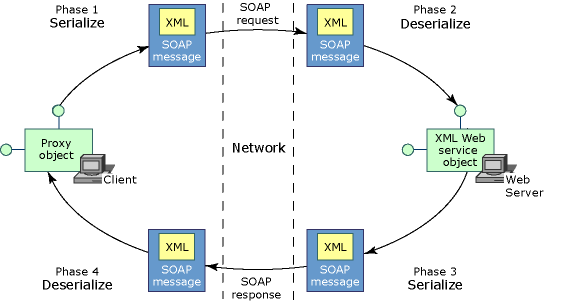
Client side
1. A client invokes a method on the proxy class.
2. A new instance of the SOAP extension is created on the client.
3. If this is the first time this SOAP extension has executed with this XML Web service on the client, then the GetInitializer method is invoked on the SOAP extension running on the client.
4. The Initialize method is invoked.
5. The ChainStream method is invoked.
6. The ProcessMessage method is invoked with the SoapMessageStage set to BeforeSerialize.
7. ASP.NET on the client computer serializes the arguments of the XML Web service method into XML.
8. The ProcessMessage method is invoked with the SoapMessageStage set to AfterSerialize.
9. ASP.NET on the client computer sends the SOAP message over the network to the Web server hosting the XML Web service.
Server side
1. ASP.NET on the Web server receives the SOAP message.
2. A new instance of the SOAP extension is created on the Web server.
3. On the Web server, if this is the first time this SOAP extension has executed with this XML Web service on the server side, the GetInitializer method is invoked on the SOAP extension running on the server.
4. The Initialize method is invoked.
5. The ChainStream method is invoked.
6. The ProcessMessage method is invoked with the SoapMessageStage set to BeforeDeserialize.
7. ASP.NET deserializes the arguments within the XML.
8. The ProcessMessage method is invoked with the SoapMessageStage set to AfterDeserialize.
9. ASP.NET creates a new instance of the class implementing the XML Web service and invokes the XML Web service method, passing in the deserialized arguments. This object resides on the same computer as the Web server.
10. The XML Web service method executes its code, eventually setting the return value and any out parameters.
11. The ProcessMessage method is invoked with the SoapMessageStage set to BeforeSerialize.
12. ASP.NET on the Web server serializes the return value and out parameters into XML.
13. The ProcessMessage method is invoked with the SoapMessageStage set to AfterSerialize.
14. ASP.NET sends the SOAP response message over the network back to the XML Web service client.
Client side
1. ASP.NET on the client computer receives the SOAP message.
2. The ProcessMessage method is invoked with the SoapMessageStage set to BeforeDeserialize.
3. ASP.NET deserializes the XML into the return value and any out parameters.
4. The ProcessMessage method is invoked with the SoapMessageStage set to AfterDeserialize.
5. ASP.NET passes the return value and any out parameters to the instance of the proxy class.
6. The client receives the return value and any out parameters.
Here what exactly the code contains.
There are three classes.
MyHeader.cs
That will contain our security token or string that server will be looking for.
using System;
using System.Collections.Generic;
using System.Text;
using System.Web.Services.Protocols;
using System.Xml.Serialization;
[Serializable]
public class MyHeader : SoapHeader
{
private string _MyHeaderValue;
public string MyHeaderValue
{
get { return _MyHeaderValue; }
set { _MyHeaderValue = value; }
}
}
MySOAPExtensionClient.cs
SOAP Extension that will add security token in header header to outgoing SOAP message
using System;
using System.Web.Services;
using System.Web.Services.Protocols;
using System.IO;
using System.Net;
using System.Diagnostics;
public class MySOAPExtensionClient : System.Web.Services.Protocols.SoapExtension
{
Stream oldStream;
Stream newStream;
public override object GetInitializer(LogicalMethodInfo methodInfo, SoapExtensionAttribute attribute)
{
return null;
}
public override object GetInitializer(Type WebServiceType)
{
return null;
}
public override void Initialize(object initializer)
{
return;
}
// Save the Stream representing the SOAP request or SOAP response into
// a local memory buffer.
public override Stream ChainStream(Stream stream)
{
oldStream = stream;
newStream = new MemoryStream();
return newStream;
}
public override void ProcessMessage(SoapMessage message)
{
switch (message.Stage)
{
case SoapMessageStage.BeforeSerialize:
if (message is SoapClientMessage)
AddHeader(message);
break;
case SoapMessageStage.AfterSerialize:
newStream.Position = 0;
Copy(newStream, oldStream);
break;
case SoapMessageStage.BeforeDeserialize:
Copy(oldStream, newStream);
newStream.Position = 0;
break;
case SoapMessageStage.AfterDeserialize:
break;
}
}
private void AddHeader(SoapMessage message)
{
MyHeader header = new MyHeader();
header.MyHeaderValue = "MyValue";
header.MustUnderstand = false;
message.Headers.Add(header);
}
private void Copy(Stream from, Stream to)
{
TextReader reader = new StreamReader(from);
TextWriter writer = new StreamWriter(to);
writer.WriteLine(reader.ReadToEnd());
writer.Flush();
}
}
MySOAPExtensionServer.cs
SOAP Extension that will will expect a security token or string in incoming SOAP request.
using System;
using System.Web.Services;
using System.Web.Services.Protocols;
using System.IO;
using System.Net;
using System.Diagnostics;
public class MySOAPExtensionServer : System.Web.Services.Protocols.SoapExtension
{
Stream oldStream;
Stream newStream;
public override object GetInitializer(LogicalMethodInfo methodInfo, SoapExtensionAttribute attribute)
{
return null;
}
public override object GetInitializer(Type WebServiceType)
{
return null;
}
public override void Initialize(object initializer)
{
return;
}
// Save the Stream representing the SOAP request or SOAP response into
// a local memory buffer.
public override Stream ChainStream(Stream stream)
{
oldStream = stream;
newStream = new MemoryStream();
return newStream;
}
public override void ProcessMessage(SoapMessage message)
{
switch (message.Stage)
{
case SoapMessageStage.BeforeSerialize:
break;
case SoapMessageStage.AfterSerialize:
newStream.Position = 0;
Copy(newStream, oldStream);
break;
case SoapMessageStage.BeforeDeserialize:
Copy(oldStream, newStream);
newStream.Position = 0;
break;
case SoapMessageStage.AfterDeserialize:
if (message is SoapServerMessage)
{
if (!IsRequestValid(message))
{
LoggerSecurity.GetInstance().WriteLog("Invalid Service Call | Action = " + message.Action + " | Url = " + message.Url);
throw new SoapException("Invalid Service Call", SoapException.ClientFaultCode);
}
}
break;
}
}
private bool IsRequestValid(SoapMessage message)
{
bool result = false;
try
{
foreach (SoapHeader header in message.Headers)
{
if (header is MyHeader)
{
MyHeader head = (MyHeader)header;
if (head.MyHeaderValue.Equals("MyValue"))
result = true;
}
else if (header is SoapUnknownHeader)
{
System.Xml.XmlElement elem = ((SoapUnknownHeader)header).Element;
if (elem.Name.Equals("MyHeader"))
{
System.Xml.XmlNode node = elem.SelectSingleNode("/");
if (node != null && node.InnerText.Equals("MyValue"))
result = true;
}
}
}
}
catch (Exception ex)
{
LoggerSecurity.GetInstance().WriteLog(ex);
}
return result;
}
private void Copy(Stream from, Stream to)
{
TextReader reader = new StreamReader(from);
TextWriter writer = new StreamWriter(to);
writer.WriteLine(reader.ReadToEnd());
writer.Flush();
}
}
In Client Web.Config before ending system.Web section add following
<webServices>
<protocols>
<remove name="HttpGet" />
<remove name="HttpPost" />
<remove name="HttpPostLocalhost" />
<remove name="Documentation" />
</protocols>
<soapExtensionTypes>
<add type="CustSoapExtension.MySOAPExtensionClient, CustSoapExtension" priority="1" group="High"/>
</soapExtensionTypes>
</webServices>
</system.web>
In Server Web.Config before ending system.Web section add following
<webServices>
<protocols>
<remove name="HttpGet" />
<remove name="HttpPost" />
<remove name="HttpPostLocalhost" />
<remove name="Documentation" />
</protocols>
<soapExtensionTypes>
<add type="CustSoapExtension.MySOAPExtensionClient, CustSoapExtension" priority="1" group="High"/>
</soapExtensionTypes>
</webServices>
</system.web>
Why these?
<remove name="HttpGet" />
<remove name="HttpPost" />
<remove name="HttpPostLocalhost" />
<remove name="Documentation" />
On production environment, if there is required only to consume webservices using only SOAP then don’t allow aceess to service using these protocoals. Only allow SOAP protocol.
Hope this sample code will help you to improve your security concern.