Sat 6 Oct 2018

Comments here
Thu 11 Aug 2016

To write arabic unicode script in MsOffice using shortcut, type fdfa then press alt+x, it will convert into its respective unicode

To write in HTML, type ﷺ  it will render it as respective unicode.

It may be require to increase the font to make it more readable

Below are some examples

fdfa Alt+x صلى الله عليه وسلم

Fdf2 Alt+x الله

Fdf3 Alt+x اكبر

Fdf4 Alt+x محمد

Fdf5 Alt+x صلعم

Fdf6 Alt+x رسول

Fdf7 Alt+x عليه

Fdf8 Alt+x وسلم

Fdf9 Alt+x صلى 


Below URL to list all unicodes

www.unicode.org/charts/PDF/Unicode-3.1/U31-FB50.pdf


Comments here
Wed 19 Aug 2009

If you are getting a popup while navigating through Microsoft Dynamics CRM Application asking you to save Blank.aspx file, following workaround will help you


Please edit the default blank.aspx file in CRM (Sever where CRM is installed) so it contains data. This file is located at My Computer | System Drive | Program Files | Microsoft Dynamics CRM | CRMWeb |_ root. Here you will find the Blank.aspx text file.


Open the file and add some text to the file, for example you can add "Test" to the file (then there would be following three lines)


Test

<% Response.Expires = 1440; %>

<% Response.Cache.SetCacheability(HttpCacheability.Public); %>


Once you have added data, save the file, clear your temporary Internet Files, and do an IISreset. Once this is done go back into CRM to verify that this has resolved this issue.


Comments (7)
Mon 3 Aug 2009
Locale ID (LCID) Chart

Updated: August 2009

The following table lists Locale IDs (LCID).

Locale description

Short string

Hexadecimal value

Decimal value

Afrikaans

af

0x0436

1078

Albanian

sq

0x041C

1052

Arabic - United Arab Emirates

ar-ae

0x3801

14337

Arabic - Bahrain

ar-bh

0x3C01

15361

Arabic - Algeria

ar-dz

0x1401

5121

Arabic - Egypt

ar-eg

0x0C01

3073

Arabic - Iraq

ar-iq

0x0801

2049

Arabic - Jordan

ar-jo

0x2C01

11265

Arabic - Kuwait

ar-kw

0x3401

13313

Arabic - Lebanon

ar-lb

0x3001

12289

Arabic - Libya

ar-ly

0x1001

4097

Arabic - Morocco

ar-ma

0x1801

6145

Arabic - Oman

ar-om

0x2001

8193

Arabic - Qatar

ar-qa

0x4001

16385

Arabic - Saudi Arabia

ar-sa

0x0401

1025

Arabic - Syria

ar-sy

0x2801

10241

Arabic - Tunisia

ar-tn

0x1C01

7169

Arabic - Yemen

ar-ye

0x2401

9217

Armenian

hy

0x042B

1067

Azeri - Latin

az-az

0x042C

1068

Azeri - Cyrillic

az-az

0x082C

2092

Basque

eu

0x042D

1069

Belarusian

be

0x0423

1059

Bulgarian

bg

0x0402

1026

Catalan

ca

0x0403

1027

Chinese - China

zh-cn

0x0804

2052

Chinese - Hong Kong SAR

zh-hk

0x0C04

3076

Chinese - Macau SAR

zh-mo

0x1404

5124

Chinese - Singapore

zh-sg

0x1004

4100

Chinese - Taiwan

zh-tw

0x0404

1028

Croatian

hr

0x041A

1050

Czech

cs

0x0405

1029

Danish

da

0x0406

1030

Dutch - Netherlands

nl-nl

0x0413

1043

Dutch - Belgium

nl-be

0x0813

2067

English - Australia

en-au

0x0C09

3081

English - Belize

en-bz

0x2809

10249

English - Canada

en-ca

0x1009

4105

English - Caribbean

en-cb

0x2409

9225

English - Ireland

en-ie

0x1809

6153

English - Jamaica

en-jm

0x2009

8201

English - New Zealand

en-nz

0x1409

5129

English - Phillippines

en-ph

0x3409

13321

English - Southern Africa

en-za

0x1C09

7177

English - Trinidad

en-tt

0x2C09

11273

English - Great Britain

en-gb

0x0809

2057

English - United States

en-us

0x0409

1033

Estonian

et

0x0425

1061

Farsi

fa

0x0429

1065

Finnish

fi

0x040B

1035

Faroese

fo

0x0438

1080

French - France

fr-fr

0x040C

1036

French - Belgium

fr-be

0x080C

2060

French - Canada

fr-ca

0x0C0C

3084

French - Luxembourg

fr-lu

0x140C

5132

French - Switzerland

fr-ch

0x100C

4108

Gaelic - Ireland

gd-ie

0x083C

2108

Gaelic - Scotland

gd

0x043C

1084

German - Germany

de-de

0x0407

1031

German - Austria

de-at

0x0C07

3079

German - Liechtenstein

de-li

0x1407

5127

German - Luxembourg

de-lu

0x1007

4103

German - Switzerland

de-ch

0x0807

2055

Greek

el

0x0408

1032

Hebrew

he

0x040D

1037

Hindi

hi

0x0439

1081

Hungarian

hu

0x040E

1038

Icelandic

is

0x040F

1039

Indonesian

id

0x0421

1057

Italian - Italy

it-it

0x0410

1040

Italian - Switzerland

it-ch

0x0810

2064

Japanese

ja

0x0411

1041

Korean

ko

0x0412

1042

Latvian

lv

0x0426

1062

Lithuanian

lt

0x0427

1063

F.Y.R.O. Macedonia

mk

0x042F

1071

Malay - Malaysia

ms-my

0x043E

1086

Malay – Brunei

ms-bn

0x083E

2110

Maltese

mt

0x043A

1082

Marathi

mr

0x044E

1102

Norwegian - Bokml

no-no

0x0414

1044

Norwegian - Nynorsk

no-no

0x0814

2068

Polish

pl

0x0415

1045

Portuguese - Portugal

pt-pt

0x0816

2070

Portuguese - Brazil

pt-br

0x0416

1046

Raeto-Romance

rm

0x0417

1047

Romanian - Romania

ro

0x0418

1048

Romanian - Republic of Moldova

ro-mo

0x0818

2072

Russian

ru

0x0419

1049

Russian - Republic of Moldova

ru-mo

0x0819

2073

Sanskrit

sa

0x044F

1103

Serbian - Cyrillic

sr-sp

0x0C1A

3098

Serbian - Latin

sr-sp

0x081A

2074

Setsuana

tn

0x0432

1074

Slovenian

sl

0x0424

1060

Slovak

sk

0x041B

1051

Sorbian

sb

0x042E

1070

Spanish - Spain (Traditional)

es-es

0x040A

1034

Spanish - Argentina

es-ar

0x2C0A

11274

Spanish - Bolivia

es-bo

0x400A

16394

Spanish - Chile

es-cl

0x340A

13322

Spanish - Colombia

es-co

0x240A

9226

Spanish - Costa Rica

es-cr

0x140A

5130

Spanish - Dominican Republic

es-do

0x1C0A

7178

Spanish - Ecuador

es-ec

0x300A

12298

Spanish - Guatemala

es-gt

0x100A

4106

Spanish - Honduras

es-hn

0x480A

18442

Spanish - Mexico

es-mx

0x080A

2058

Spanish - Nicaragua

es-ni

0x4C0A

19466

Spanish - Panama

es-pa

0x180A

6154

Spanish - Peru

es-pe

0x280A

10250

Spanish - Puerto Rico

es-pr

0x500A

20490

Spanish - Paraguay

es-py

0x3C0A

15370

Spanish - El Salvador

es-sv

0x440A

17418

Spanish - Uruguay

es-uy

0x380A

14346

Spanish - Venezuela

es-ve

0x200A

8202

Southern Sotho

st

0x0430

1072

Swahili

sw

0x0441

1089

Swedish - Sweden

sv-se

0x041D

1053

Swedish - Finland

sv-fi

0x081D

2077

Tamil

ta

0x0449

1097

Tatar

tt

0X0444

1092

Thai

th

0x041E

1054

Turkish

tr

0x041F

1055

Tsonga

ts

0x0431

1073

Ukrainian

uk

0x0422

1058

Urdu

ur

0x0420

1056

Uzbek - Cyrillic

uz-uz

0x0843

2115

Uzbek – Latin

uz-uz

0x0443

1091

Vietnamese

vi

0x042A

1066

Xhosa

xh

0x0434

1076

Yiddish

yi

0x043D

1085

Zulu

zu

0x0435

1077

Comments here
Thu 1 Jan 2009

 Microsoft Application Architecture Guide 2.0‏.  Nice stuff for those who are interested in Application architecture at http://www.codeplex.com/AppArchGuide

Summary :

Parts

Part I, Fundamentals
Part II, Design
Part III, Layers
Part IV, Archetypes

Forewords

*   Foreword by S. Somasegar

*   Foreword by Scott Guthrie

Chapters

*   Introduction

*   Architecture and Design Solutions At a Glance

*   Fast Track

Part I, Fundamentals

*   Chapter 1 - Fundamentals of Application Architecture

*   Chapter 2 - .NET Platform Overview

*   Chapter 3 - Architecture and Design Guidelines

Part II, Design

*   Chapter 4 - Designing Your Architecture

*   Chapter 5 - Deployment Patterns

*   Chapter 6 - Architectural Styles

*   Chapter 7 - Quality Attributes

*   Chapter 8 - Communication Guidelines

Part III, Layers

*   Chapter 9 - Layers and Tiers

*   Chapter 10 - Presentation Layer Guidelines

*   Chapter 11 - Business Layer Guidelines

*   Chapter 12 - Data Access Layer Guidelines

*   Chapter 13 - Service Layer Guidelines

Part IV, Archetypes

*   Chapter 14 - Application Archetypes

*   Chapter 15 - Web Applications

*   Chapter 16 - Rich Internet Applications (RIA)

*   Chapter 17 - Rich Client Applications

*   Chapter 18 - Services

*   Chapter 19 - Mobile Applications

*   Chapter 20 - Office Business Applications (OBA)

*   Chapter 21 - SharePoint Line-Of-Business (LOB) Applications

Appendix

*   Cheat Sheet - patterns & practices Pattern Catalog

*   Cheat Sheet - Presentation Technology Matrix

*   Cheat Sheet - Data Access Technology Matrix

*   Cheat Sheet - Workflow Technology Matrix

*   Cheat Sheet - Integration Technology Matrix

Errata Page

*   Errata Page

Team

*   Core Dev Team: J.D. Meier , Alex Homer, David Hill, Jason Taylor , Prashant Bansode , Lonnie Wall, Rob Boucher Jr, Akshay Bogawat

*   Test Team - Rohit Sharma, Praveen Rangarajan, Kashinath TR, Vijaya Jankiraman

*   Edit Team - Dennis Rea.

*   External Contributors/Reviewers - Adwait Ullal; Andy Eunson; Brian Sletten; Christian Weyer; David Guimbellot; David Ing; David Weller; Derek Greer; Eduardo Jezierski; Evan Hoff; Gajapathi Kannan; Jeremy D. Miller; John Kordyback; Keith Pleas; Kent Corley; Mark Baker; Paul Ballard; Peter Oehlert; Norman Headlam; Ryan Plant; Sam Gentile; Sidney G Pinney; Ted Neward; Udi Dahan

*   Microsoft Contributors / Reviewers - Ade Miller; Amit Chopra; Anna Liu; Anoop Gupta; Bob Brumfield; Brad Abrams; Brian Cawelti; Bhushan Nene; Burley Kawasaki; Carl Perry; Chris Keyser; Chris Tavares; Clint Edmonson; Dan Reagan; David Hill; Denny Dayton; Diego Dagum; Dmitri Martynov; Dmitri Ossipov; Don Smith; Dragos Manolescu; Elisa Flasko; Eric Fleck; Erwin van der Valk; Faisal Mohamood; Francis Cheung; Gary Lewis; Glenn Block; Gregory Leake; Ian Ellison-Taylor; Ilia Fortunov; J.R. Arredondo; John deVadoss; Joseph Hofstader; Koby Avital; Loke Uei Tan; Luke Nyswonger; Manish Prabhu; Meghan Perez; Mehran Nikoo; Michael Puleio; Mike Francis; Mike Walker; Mubarak Elamin; Nick Malik; Nobuyuki Akama; Ofer Ashkenazi; Pablo Castro; Pat Helland; Phil Haack; Reed Robison; Rob Tiffany; Ryno Rijnsburger; Scott Hanselman; Seema Ramchandani; Serena Yeoh; Simon Calvert; Srinath Vasireddy; Tom Hollander; Wojtek Kozaczynski


To download go to following link.

http://www.codeplex.com/AppArchGuide


Comments here
Wed 3 Sep 2008

Google launches internet browser

Google's new web browser is called Chrome
 It's certainly the biggest news in the browser space since Firefox started to dent Internet Explorer's lead and many people see this as a re-ignition of the browser wars 
Darren Waters

Google is launching an open source web browser to compete with Internet Explorer and Firefox.

The browser is designed to be lightweight and fast, and to cope with the next generation of web applications that rely on graphics and multimedia.

Called Chrome, it will launch as a beta for Windows machines in 100 countries, with Mac and Linux versions to come.

"We realised... we needed to completely rethink the browser," said Google's Sundar Pichai in a blog post.

The new browser will help Google take advantage of developments it is pushing online in rich web applications that are challenging traditional desktop programs.

Google has a suite of web apps, such as Documents, Picasa and Maps which offer functionality that is beginning to replace offline software.

"What we really needed was not just a browser, but also a modern platform for web pages and applications, and that's what we set out to build," Mr Pichai, VP Product Management, wrote.

Competition

The launch of a beta version of Chrome on Tuesday evening (UK time) will be Google's latest assault on Microsoft's dominance of the PC business. The firm's Internet Explorer program dominates the browser landscape, with 80% of the market.

Those already in the browser space were quick to respond to the news.

Writing in his blog, John Lilly, chief executive of Mozilla was sanguine about the new rival in the browsersphere.

"It should come as no real surprise that Google has done something here — their business is the web, and they’ve got clear opinions on how things should be, and smart people thinking about how to make things better."

Chrome will be a browser optimized for the things that they see as important, and it’ll be interesting to see how it evolves," he wrote.

He welcomed the competition and said collaboration between Mozilla and Google on certain projects would continue.

Dean Hachamovitch, general manager of Microsoft's Internet Explorer, was more bullish.

"The browser landscape is highly competitive, but people will choose Internet Explorer 8 for the way it puts the services they want right at their fingertips, respects their personal choices about how they want to browse and, more than any other browsing technology, puts them in control of their personal data online," he said in a statement.

Chrome will be available for download from the morning of Wednesday 3rd September, PST.


Tags: ,
Comments here
Fri 4 Jul 2008

Web Service Security using SOAP Extension


Yesterday I was trying to secure my webserice from unauthorized use.

Although there are many ways to secure webservices. Using WSE, WS-security, SOAP Extension, restricting through IP access, implementing certificates etc etc etc.


WSE would be the comfortable way but in my case it was time consuming to implement at both server and client end as there were hundreds of services. Restricting IP throu IIS or http handler / modules would be a good choice. I tried to do it with SOAP Extension that could be plug and play with a single entry in web.config. It works like httpmodule that reside in pipeline of communication between client and server.


Here after enough googling I have a very simple SOAP Extension that would help anyone if just want to secure service that request is coming from authenticated source. Although there would be still many security breaches but here you go.


What this SOAP extension will do?

Before passing request to webserver, this extension will add a string or any unique token to header of SOAP message then will pass it over network. Before server entertain the request it will look for that token or string in the header of incoming SOAP message request. If exsit then will allow to consume service else will throw an exception or whatever the action depending upon scenario.


SOAP Message Lifecycle.


Client = Going to accessing service

Server = Where service exists and entertaining client request.
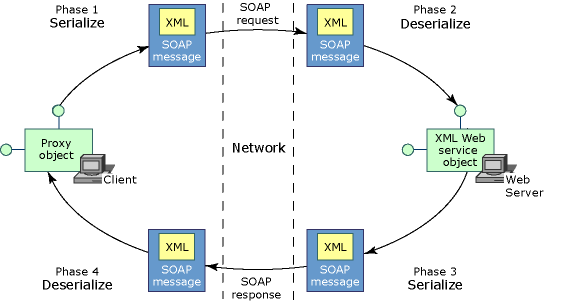


SOAPExtension Life.gif


Client side

1.    A client invokes a method on the proxy class.

2.    A new instance of the SOAP extension is created on the client.

3.    If this is the first time this SOAP extension has executed with this XML Web service on the client, then the GetInitializer method is invoked on the SOAP extension running on the client.

4.    The Initialize method is invoked.

5.    The ChainStream method is invoked.

6.    The ProcessMessage method is invoked with the SoapMessageStage set to BeforeSerialize.

7.    ASP.NET on the client computer serializes the arguments of the XML Web service method into XML.

8.    The ProcessMessage method is invoked with the SoapMessageStage set to AfterSerialize.

9.    ASP.NET on the client computer sends the SOAP message over the network to the Web server hosting the XML Web service.


Server side

1.    ASP.NET on the Web server receives the SOAP message.

2.    A new instance of the SOAP extension is created on the Web server.

3.    On the Web server, if this is the first time this SOAP extension has executed with this XML Web service on the server side, the GetInitializer method is invoked on the SOAP extension running on the server.

4.    The Initialize method is invoked.

5.    The ChainStream method is invoked.

6.    The ProcessMessage method is invoked with the SoapMessageStage set to BeforeDeserialize.

7.    ASP.NET deserializes the arguments within the XML.

8.    The ProcessMessage method is invoked with the SoapMessageStage set to AfterDeserialize.

9.    ASP.NET creates a new instance of the class implementing the XML Web service and invokes the XML Web service method, passing in the deserialized arguments. This object resides on the same computer as the Web server.

10.  The XML Web service method executes its code, eventually setting the return value and any out parameters.

11.  The ProcessMessage method is invoked with the SoapMessageStage set to BeforeSerialize.

12.  ASP.NET on the Web server serializes the return value and out parameters into XML.

13.  The ProcessMessage method is invoked with the SoapMessageStage set to AfterSerialize.

14.  ASP.NET sends the SOAP response message over the network back to the XML Web service client.


Client side

1.    ASP.NET on the client computer receives the SOAP message.

2.    The ProcessMessage method is invoked with the SoapMessageStage set to BeforeDeserialize.

3.    ASP.NET deserializes the XML into the return value and any out parameters.

4.    The ProcessMessage method is invoked with the SoapMessageStage set to AfterDeserialize.

5.    ASP.NET passes the return value and any out parameters to the instance of the proxy class.

6.    The client receives the return value and any out parameters.


Here what exactly the code contains.

There are three classes.

MyHeader.cs

That will contain our security token or string that server will be looking for.


using System;

using System.Collections.Generic;

using System.Text;

using System.Web.Services.Protocols;

using System.Xml.Serialization;


    [Serializable]

    public class MyHeader : SoapHeader

    {

        private string _MyHeaderValue;


        public string MyHeaderValue

        {

            get { return _MyHeaderValue; }

            set { _MyHeaderValue = value; }

        }

    }


MySOAPExtensionClient.cs

SOAP Extension that will add security token in header header to outgoing SOAP message


using System;

using System.Web.Services;

using System.Web.Services.Protocols;

using System.IO;

using System.Net;

using System.Diagnostics;


    public class MySOAPExtensionClient : System.Web.Services.Protocols.SoapExtension

    {

        Stream oldStream;

        Stream newStream;


        public override object GetInitializer(LogicalMethodInfo methodInfo, SoapExtensionAttribute attribute)

        {

            return null;

        }


        public override object GetInitializer(Type WebServiceType)

        {

            return null;

        }


        public override void Initialize(object initializer)

        {

            return;

        }


        // Save the Stream representing the SOAP request or SOAP response into

        // a local memory buffer.

        public override Stream ChainStream(Stream stream)

        {

            oldStream = stream;

            newStream = new MemoryStream();

            return newStream;

        }


        public override void ProcessMessage(SoapMessage message)

        {

            switch (message.Stage)

            {

                case SoapMessageStage.BeforeSerialize:

                    if (message is SoapClientMessage)

                        AddHeader(message);

                    break;

                case SoapMessageStage.AfterSerialize:

                    newStream.Position = 0;

                    Copy(newStream, oldStream);

                    break;

                case SoapMessageStage.BeforeDeserialize:

                    Copy(oldStream, newStream);

                    newStream.Position = 0;

                    break;

                case SoapMessageStage.AfterDeserialize:

                    break;

            }

        }


        private void AddHeader(SoapMessage message)

        {

            MyHeader header = new MyHeader();

            header.MyHeaderValue = "MyValue";

            header.MustUnderstand = false;

            message.Headers.Add(header);

        }


        private void Copy(Stream from, Stream to)

        {

            TextReader reader = new StreamReader(from);

            TextWriter writer = new StreamWriter(to);

            writer.WriteLine(reader.ReadToEnd());

            writer.Flush();

        }

    }


MySOAPExtensionServer.cs

SOAP Extension that will will expect a security token or string in incoming SOAP request.


using System;

using System.Web.Services;

using System.Web.Services.Protocols;

using System.IO;

using System.Net;

using System.Diagnostics;


    public class MySOAPExtensionServer : System.Web.Services.Protocols.SoapExtension

    {

        Stream oldStream;

        Stream newStream;


        public override object GetInitializer(LogicalMethodInfo methodInfo, SoapExtensionAttribute attribute)

        {

            return null;

        }


        public override object GetInitializer(Type WebServiceType)

        {

            return null;

        }


        public override void Initialize(object initializer)

        {

            return;

        }


        // Save the Stream representing the SOAP request or SOAP response into

        // a local memory buffer.

        public override Stream ChainStream(Stream stream)

        {

            oldStream = stream;

            newStream = new MemoryStream();

            return newStream;

        }


        public override void ProcessMessage(SoapMessage message)

        {

            switch (message.Stage)

            {

                case SoapMessageStage.BeforeSerialize:

                    break;

                case SoapMessageStage.AfterSerialize:

                    newStream.Position = 0;

                    Copy(newStream, oldStream);

                    break;

                case SoapMessageStage.BeforeDeserialize:

                    Copy(oldStream, newStream);

                    newStream.Position = 0;

                    break;

                case SoapMessageStage.AfterDeserialize:

                    if (message is SoapServerMessage)

                    {

                        if (!IsRequestValid(message))

                        {

                            LoggerSecurity.GetInstance().WriteLog("Invalid Service Call | Action = " + message.Action + " | Url = " + message.Url);

                            throw new SoapException("Invalid Service Call", SoapException.ClientFaultCode);

                        }

                    }

                    break;

            }

        }


        private bool IsRequestValid(SoapMessage message)

        {

            bool result = false;

            try

            {

                foreach (SoapHeader header in message.Headers)

                {

                    if (header is MyHeader)

                    {

                        MyHeader head = (MyHeader)header;

                        if (head.MyHeaderValue.Equals("MyValue"))

                            result = true;

                    }


                    else if (header is SoapUnknownHeader)

                    {

                        System.Xml.XmlElement elem = ((SoapUnknownHeader)header).Element;

                        if (elem.Name.Equals("MyHeader"))

                        {

                            System.Xml.XmlNode node = elem.SelectSingleNode("/");

                            if (node != null && node.InnerText.Equals("MyValue"))

                                result = true;

                        }

                    }

                }

            }

            catch (Exception ex)

            {

                LoggerSecurity.GetInstance().WriteLog(ex);

            }

            return result;

        }


        private void Copy(Stream from, Stream to)

        {

            TextReader reader = new StreamReader(from);

            TextWriter writer = new StreamWriter(to);

            writer.WriteLine(reader.ReadToEnd());

            writer.Flush();

        }

    }


In Client Web.Config before ending system.Web section add following


        <webServices>

              <protocols>

                    <remove name="HttpGet" />

                    <remove name="HttpPost" />

                    <remove name="HttpPostLocalhost" />

                    <remove name="Documentation" />

              </protocols>

              <soapExtensionTypes>

                    <add type="CustSoapExtension.MySOAPExtensionClient, CustSoapExtension" priority="1" group="High"/>

              </soapExtensionTypes>

        </webServices>


  </system.web>


In Server Web.Config before ending system.Web section add following


        <webServices>

              <protocols>

                    <remove name="HttpGet" />

                    <remove name="HttpPost" />

                    <remove name="HttpPostLocalhost" />

                    <remove name="Documentation" />

              </protocols>

              <soapExtensionTypes>

                    <add type="CustSoapExtension.MySOAPExtensionClient, CustSoapExtension" priority="1" group="High"/>

              </soapExtensionTypes>

        </webServices>


  </system.web>


Why these?

                    <remove name="HttpGet" />

                    <remove name="HttpPost" />

                    <remove name="HttpPostLocalhost" />

                    <remove name="Documentation" />


On production environment, if there is required only to consume webservices using only SOAP then don’t allow aceess to service using these protocoals. Only allow SOAP protocol.


Hope this sample code will help you to improve your security concern.


Comments (3)